Made for nail technicians

Stop Chasing
Booking Deposits
in Your DMs.

Clients pick a time and pay their deposit right in WhatsApp. You don't have to ask twice, and you don't lose the slot when they ghost you.

Free plan forever · works on any phone browser, no install needed

Payments via Paystack
POPIA-conscious
Made in South Africa
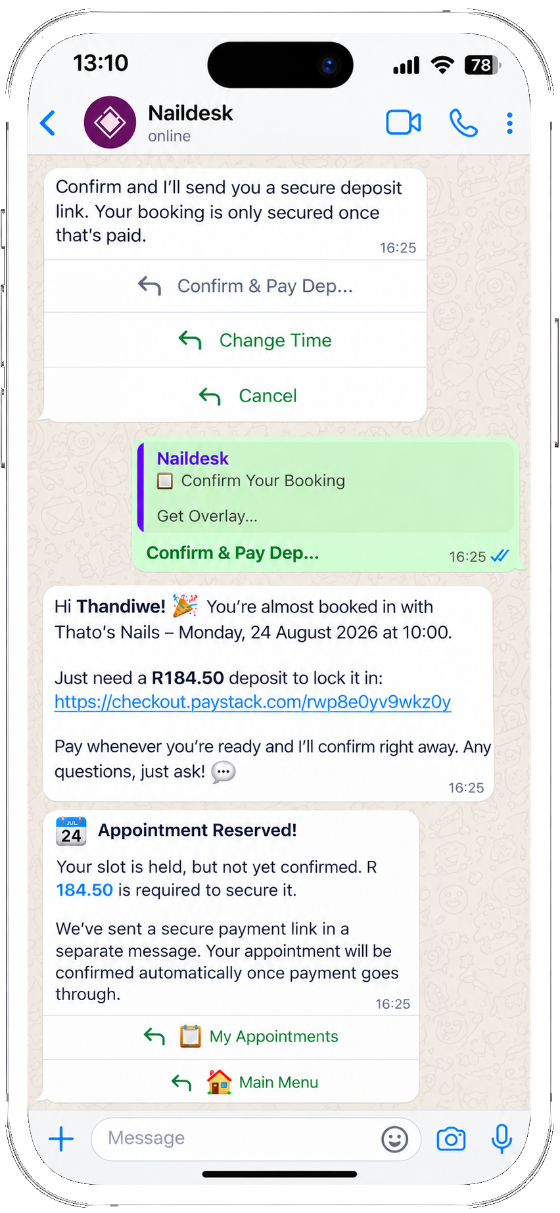
A real WhatsApp conversation where the NailDesk bot asks a client for a deposit and reserves their appointment
How it works

Two sides, one app.

You run the business from the app. Your clients book through WhatsApp, no download needed.

For nail technicians

Run your business, your way

Sign up in the browser

Create your free account at app.naildesk.co.za, no download required, and add your service menu with prices and duration in minutes.

Share your booking link

Your unique booking link is generated instantly. Share it in your Instagram bio, a WhatsApp status, or a text.

Manage everything on the app

View your calendar, client history, deposits and earnings, all in one dashboard. Reminders sent automatically.

For clients

Book in under a minute, no app needed

Tap the tech's booking link

Client taps the link shared with them, in a bio, a status, or a chat. No app download, no sign-up required on their end.

Open the booking flow

A booking form opens right inside WhatsApp. Browse the technician's live service menu, select a treatment, and choose a slot in a few taps. No back-and-forth texting.

Booking confirmed instantly

Confirmation sent in WhatsApp. Both the client and tech get instant notifications and a reminder before the appointment.

Features

Built for how a one-person
nail business actually runs.

No features you'll never touch, no team seats you don't need.

Every plan Grow & Pro Pro only

Real-time scheduling

Your calendar updates instantly. Clients only see open slots, so double-bookings can't happen.

Every plan

WhatsApp booking bot

Clients book directly in WhatsApp through your own bot. Reminders go out automatically before each appointment.

Every plan

Client management

A client database with booking history, preferences, allergies and notes, so you remember every regular.

Every plan

Deposit collection

Collect deposits via Paystack before a booking is confirmed, so a no-show costs you nothing.

Grow & Pro

Earnings reports

Track revenue by service, week and month, and see exactly where your income is coming from.

Pro only

Portfolio gallery

Showcase your nail art on your booking profile, so your own work does the selling.

Grow & Pro

Smart notifications

Push alerts for new bookings, cancellations and deposits, whether you're at the salon or off for the day.

Every plan

Secure & POPIA-conscious

Your data and your clients' data are encrypted and stored with South African privacy law in mind.

Every plan
Preview

What a client sees before they even chat.

A simulated view of the public profile page your booking link opens, in the client's own browser, before WhatsApp ever comes up.

app.naildesk.co.za/p/sarahs-nails
S

Sarah's Nails

Professional Nail Artist · Sarah

4.9 · 32 reviews

Services

Gel Overlay

~60 min

R369

Acrylic Full Set

~90 min

R450

Portfolio

Reviews

N

Naledi

"My gel overlay lasted three full weeks. Booking was so easy too!"

Book on WhatsApp

* Content shown is illustrative. Each registered tech sets their own menu, photos & rates inside NailDesk.

Your unique booking link

app.naildesk.co.za/p/your-name

Copy & share WhatsApp active
Android APK

Installing NailDesk
takes 60 seconds.

Prefer an app icon on your home screen? Installing the Android APK is optional, the web version at app.naildesk.co.za works the same. Here's how to install it safely:

Download APK · v1.0.0

Android only · You may need to allow installs from your browser when prompted

Step-by-step guide

Tap "Download APK"

The APK file will download to your Android device.

Open the downloaded file

Tap the notification or open your Downloads folder and tap NailDesk.apk.

Allow install from browser (if asked)

Android may ask permission to install from your browser. Tap Allow or Install anyway. This is normal for APK installs.

Tap Install, then Open

Once installed, tap Open to launch NailDesk.

Sign up and set up your profile

Create your account, add your services, and start taking bookings within minutes.

Pricing

Start free. Upgrade when you're busy enough to need it.

Free needs no credit card. Every paid plan includes a 14-day free trial before your card is charged, managed inside the app via Paystack. Cancel anytime from app settings.

Free

See if it fits before you commit

R0 /month

Stays free forever, no trial, no card needed


  • Up to 10 bookings per month
  • Up to 3 services
  • Up to 6 portfolio images
  • WhatsApp booking bot
  • Deposit collection
  • Waitlist management
Get started free

No credit card · no trial countdown

Recommended

Grow

Built for a solo tech with a full book

R79 /month

14-day free trial · Cancel anytime in-app


  • 60 bookings per month
  • Up to 15 services
  • Up to 30 portfolio images
  • Deposit collection via Paystack
  • Waitlist management
  • WhatsApp booking bot & reminders
Upgrade to Grow

14-day free trial included

Pro

No caps, priority support

R139 /month

14-day free trial · Cancel anytime in-app


  • Unlimited bookings
  • Unlimited services
  • Unlimited portfolio images
  • Deposit collection & waitlist management
  • Earnings analytics & reports
  • WhatsApp booking bot & reminders
Upgrade to Pro

14-day free trial included

Payments via Paystack, processed inside the app Cancel anytime from app settings Visa & Mastercard accepted
FAQ

Frequently asked questions

Still have questions? Reach out any time through the channels below.

NailDesk works in any phone or desktop browser, no install needed. An Android app is also available if you'd prefer an app icon on your home screen.

Tap "Download APK" on this page, open the downloaded file, and follow the on-screen prompts. Android may ask you to allow installs from your browser, tap Allow. The full step-by-step guide is in the "Installing NailDesk" section above.

No. Your clients do not need to install anything. They book entirely through WhatsApp by clicking your personal booking link. As long as they have WhatsApp, they're good to go.

When a client taps your booking link, a WhatsApp chat opens with an automated bot. The bot shows your service menu, available time slots, and guides the client through booking step by step. Once confirmed, both you and the client receive a notification, and the appointment appears instantly on your app dashboard.

When you create your account, you get a 14-day free trial with access to all paid features. No credit card is required to start the trial. At the end of the trial, you can choose to upgrade from within the app or continue on the Free plan with its limits.

Yes. You can cancel your subscription at any time directly from the app settings. There are no lock-in contracts. After cancellation, you retain access until the end of the billing period and then revert to the Free plan.

Yes. NailDesk encrypts data in transit and at rest. The platform is designed to be POPIA-conscious, meaning it is built with South African data privacy law in mind. You own your business data and your clients' information is stored securely and used only to power your bookings.

Subscription payments are processed securely via Paystack inside the app. NailDesk does not store your card details. Deposit collection from your clients (available on Grow and Pro plans) is also handled through your Paystack subaccount, so funds go directly to you.

Get in touch

We're here to help.

Have a question, need support, or want to give feedback? Reach us through any of these channels.

Email Support

For billing, account or technical questions.

support@naildesk.co.za

Response within 1–2 business days

WhatsApp Support

Chat with the support team directly.

Chat on WhatsApp

Mon – Fri · 08:00 – 18:00 SAST

About NailDesk

NailDesk is operated by K2026429436 (South Africa).

Midrand, Gauteng, South Africa

Your next client is already messaging you on WhatsApp.

Give them a link that gets you paid before they cancel.

Free to start · no card needed · works on any phone